

How to speed up K1 filings using Cash Flow Portal

As K1s filings season is at its peak, we decided to share this short guide with you to help you make this process faster and more efficient. With Cash Flow Portal, you can save 75% of the time you usually spend on K1s filings. One of our software’s best features is document management, which gives you the ability to share Schedule K1s.
So here is the step-by-step guide on how to use Cash Flow Portal for K1 filings. If you haven’t signed up yet, now you can try our syndication software completely free without a paywall or commitment.
Step 1: Log in to Cash Flow Portal, click on “Documents,” then select your deal.
Step 2: Create a new section called “2020 K1 Tax Documents” or name it differently if you wish:
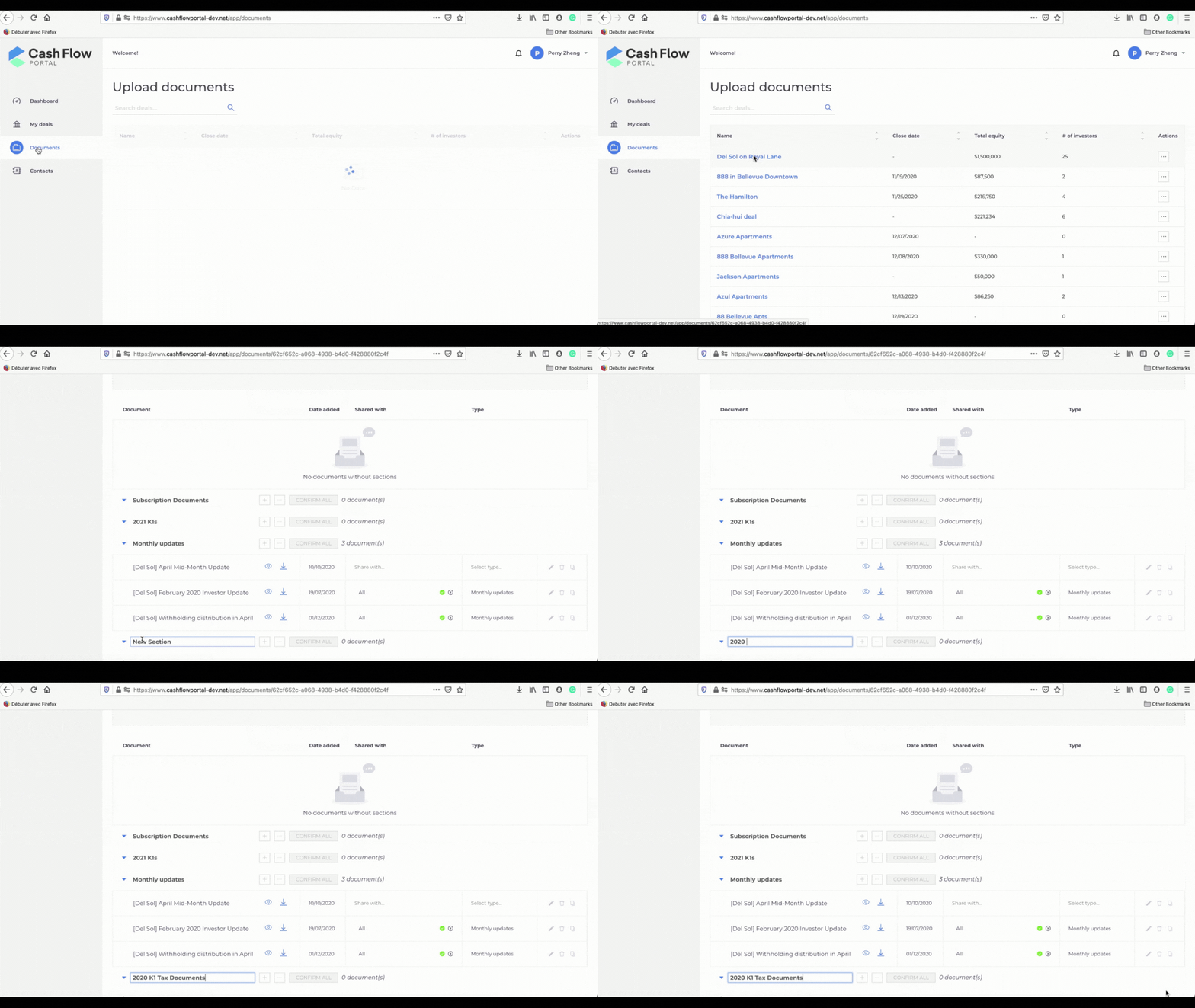
Step 3: To upload your documents to the newly created section, click on the “+” sign next to the section name. Make sure that you name your K1 files correctly using the first and the last name of the investors. It is an essential step because our system recognizes the file names and assigns them automatically to respective persons.
If you haven’t added investors yet, you can go to your deal and add them here:

Step 4: You can choose to upload documents one by one. Double-check that they are assigned to the right person and click “Confirm”:

Or you can mass-upload your K1s and then click on “Confirm all”. The system will automatically recognize file names and auto-assign them to all your investors:

Congratulations! You’ve just completed assigning your K1s!
Want to learn how to add deal classes?
About the author

Kristina Xie
Kristina Xie is a real estate syndication enthusiast. She invests in properties in NYC, however became interested in large scale multifamily units after attending her first real estate conference in November 2021. When she is not actively interviewing people or writing articles, she enjoys the outdoors and traveling around the world!
Related posts

Demo: Investing in a deal as a joint tenancy using Cash Flow Portal
By Kristina Xie | 12/10/21 | Software demos
When syndicating a deal using Cash Flow Portal, it is common to encounter couples investing as a joint tenancy. In this guide, we will walk you through the process of creating e-sign templates and allowing your LPs to invest as a joint tenancy. #1 Create a deal The first step is to create a deal […]

How to create an offering with Cash Flow Portal
By Kristina Xie | 12/02/21 | Software demos
Introduction An offering refers to when a company issues or sells a security. In multifamily syndications, potential investors must receive a professional offering package. It contains documents prepared by an SEC attorney that investors must read and sign in order to invest. Therefore, in simple terms, an offering is a security. Now, let’s look at […]

How to invest in a deal using Cash Flow Portal. Passive investor demo
By Kristina Xie | 10/06/21 | Software demos
Step 1: Follow the link sent by your GP or co-sponsor to view the deal offering: You should have received the link by email from your sponsor. Once you click on it, you will see the deal dashboard, and then you can click the “Invest now” button to begin. Log in or sign up to […]
Most popular posts
 AI for Capital Raisers07/08/26 | Guides for syndicators
 Best CRM for Capital Raisers07/01/26 | Guides for syndicators
 The 10 Hottest Cities to Invest in Real Estate Before 202507/20/22 | Announcements
 Bonus Depreciation for Real Estate Professionals09/09/21 | Passive investor guides
 Free tools to help you develop your real estate syndication blog in 202108/06/21 | Guides for syndicators
Categories


 Seattle, WA







Support
Contact usProducts
Capital raising
Why Cash Flow PortalEquity raising simplifiedFunds on Cash Flow PortalCo-sponsorsCustom brandingProperty management
BookkeepingBank syncQuickbooks integrationReportsOwner portalMaintenanceApplications & eSignTenant screeningCRMRent collectionTenant portalCommunicationFund admin
Fund administrationInstitutional fund administrationSPVsFund admin servicesIntegrated CPA servicesBanking
Integrated bankingLeads
New leads©2026 All rights reserved. Cash Flow Portal Inc.